Built for iOS 26 Apple Intelligence, Markdown & iCloud Drive

The Apple-native workspace for intelligent writing

Writify saves every document as a standard Markdown file on your iCloud Drive. Edit them in any app, sync them automatically, and let Apple Intelligence assist you across your entire Apple ecosystem.

  • Standard Markdown files on iCloud Drive — your documents, your control
  • Context-aware AI suggestions tailored to each project
  • Per-document language, zoom, and background controls
3 s
Auto-save cadence
25+
Languages coming soon
Project-based workspaces
Chapter 1: The Beginning
Continue the story...
Apple Intelligence + Pro Writing

Everything on the roadmap is already mapped to what writers need most

Explore the complete feature set prioritized by storytellers, strategists, and teams building on the Apple ecosystem. Every capability below exists today or is clearly marked as coming soon.

Essential Writing Features

Essential writing tools built for Apple-first creators

Deliver professional documents faster with a rich text editor, FoundationModels-powered assistance, and language-aware workflows.

Rich Text Editor

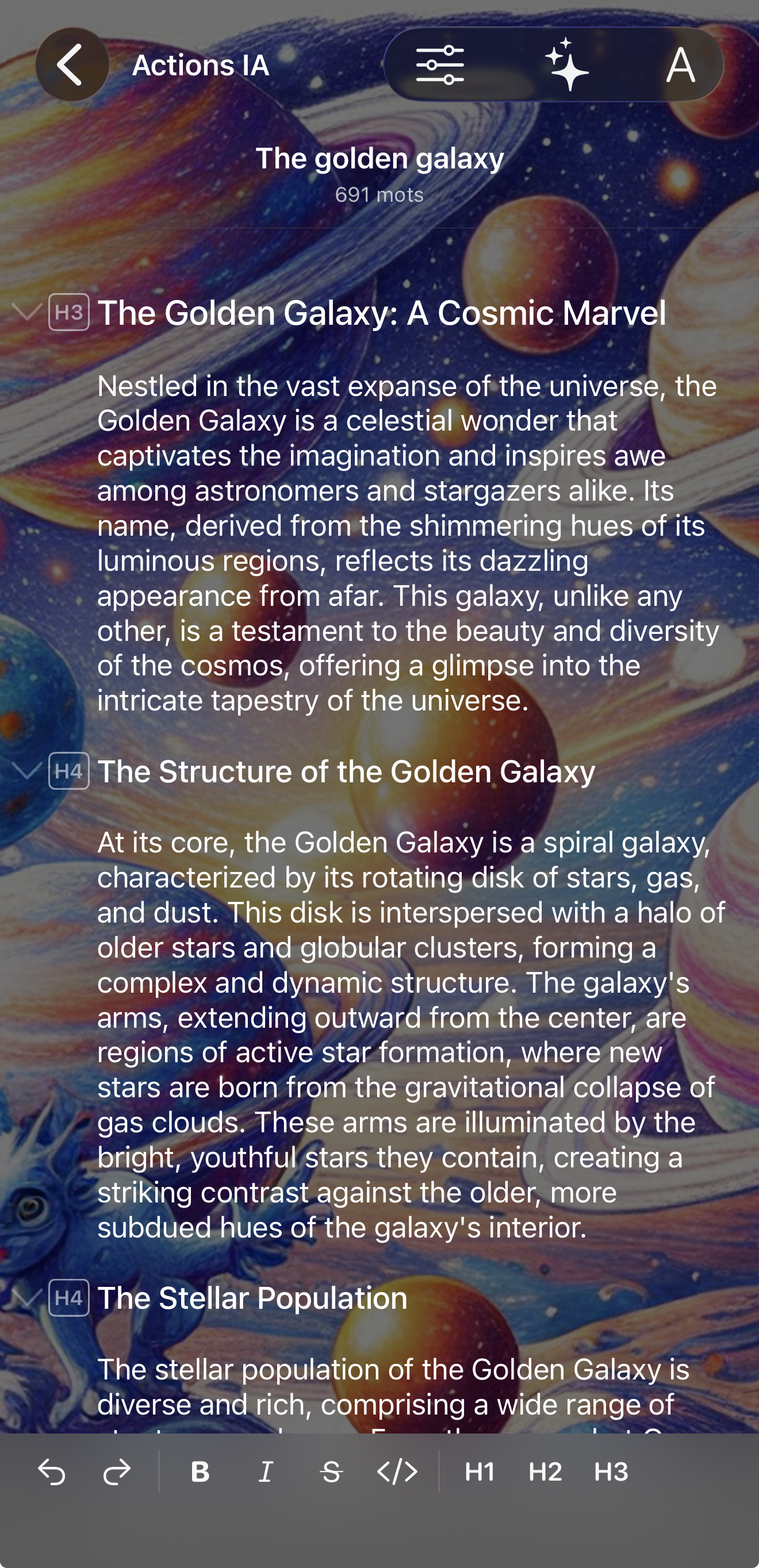
Write in a modern canvas that keeps every paragraph, heading, and list perfectly styled across Apple platforms.

  • Markdown compatibility for seamless cross-platform document sharing
  • Documents saved as Markdown files on iCloud Drive, editable in any app
  • Robust formatting controls: bold, italic, underline, headers, lists, and strikethrough
  • Per-document or global text zoom with adaptive font scaling
Apple Intelligence Integration

Harness iOS 26+ Apple Intelligence to accelerate drafting, editing, and ideation in every project.

  • Smart text processing powered by the FoundationModels framework
  • Context-aware writing assistance that adapts to each document
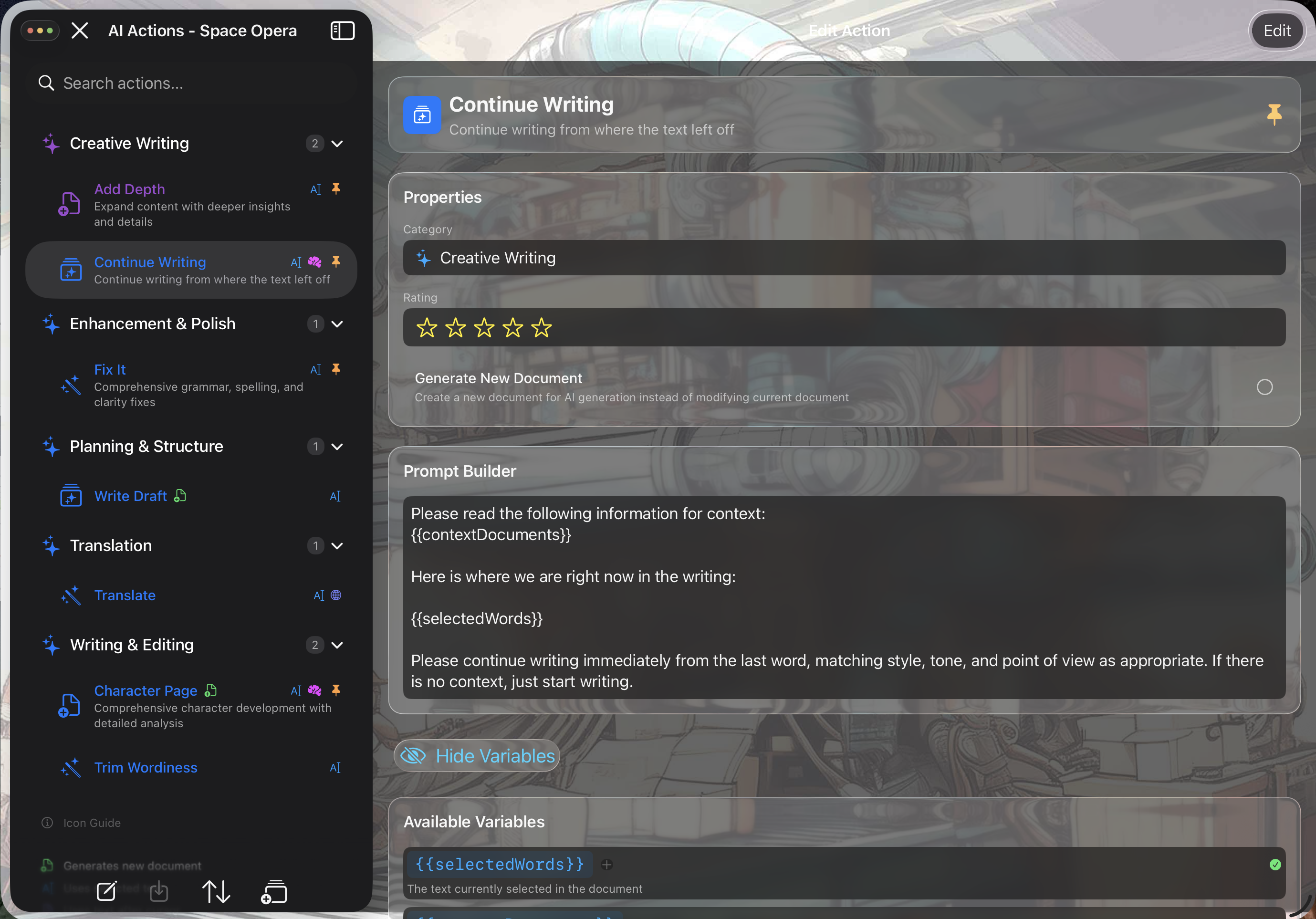
  • Custom AI actions library with project-specific prompts
  • Language-aware AI prompts tied to project language settings
  • AI conversation history per project for Pro workspaces

Multi-language Support

Collaborate globally while staying sensitive to tone, nuance, and culture.

  • Per-project language preferences that guide the entire workspace
  • Cultural context awareness in AI interactions and suggestions
  • Coming soon 25+ supported languages including English, French, Spanish, and German
Project & Document Organization

Structure every idea with project-based control

Plan story arcs, manage research, and keep every draft easy to find with nested folders and intelligent filters.

Project-Based Organization

Switch between color-coded workspaces to manage clients, series, or teams with confidence.

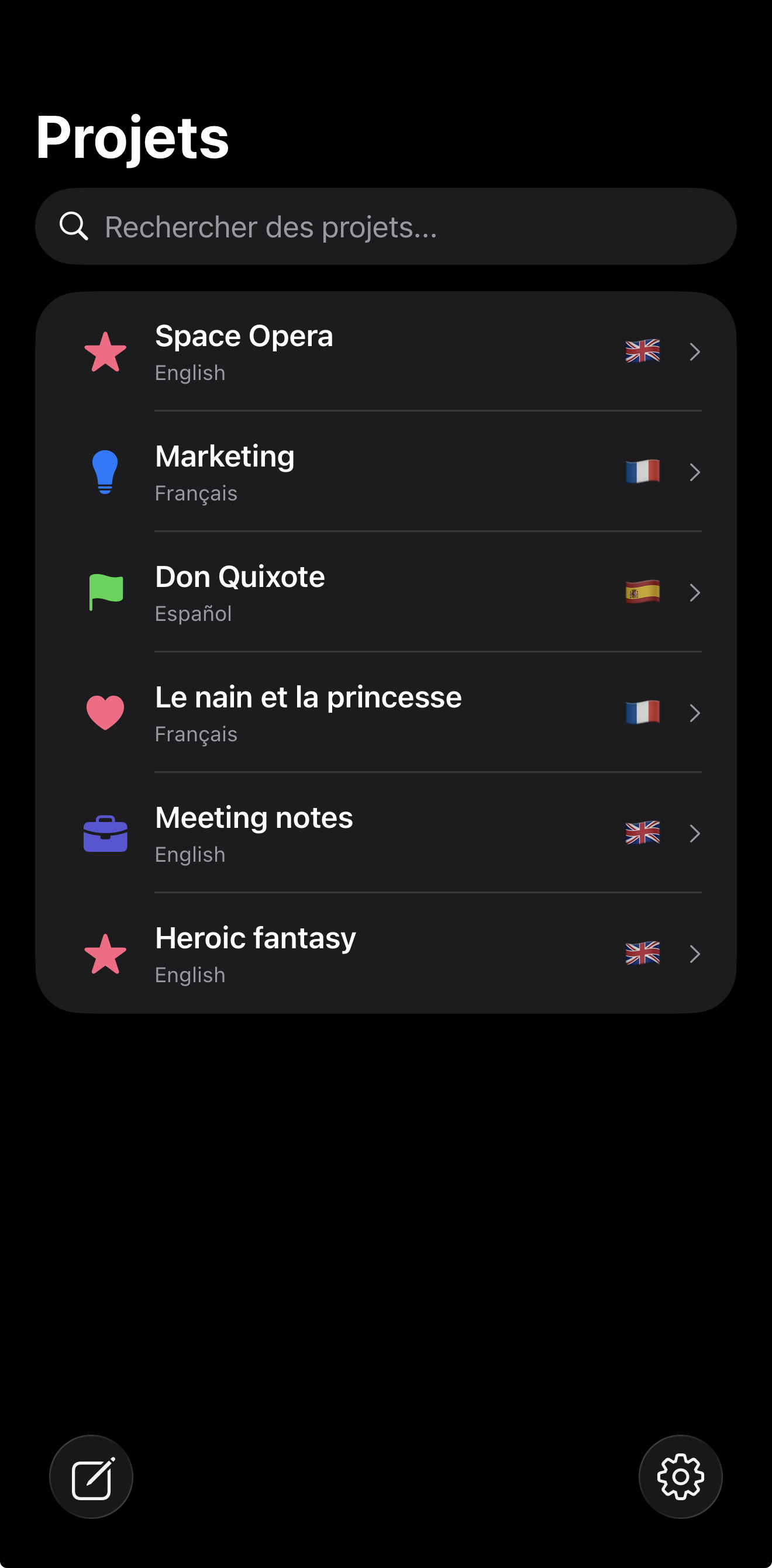
  • Multi-project workspace with customizable colors and icons
  • Project-level settings for language, AI temperature, and custom categories
  • Folder hierarchy for deep document organization
  • Smart filtering by folder, tags, or advanced search criteria

Document Management

Bring each page to life without sacrificing readability or focus.

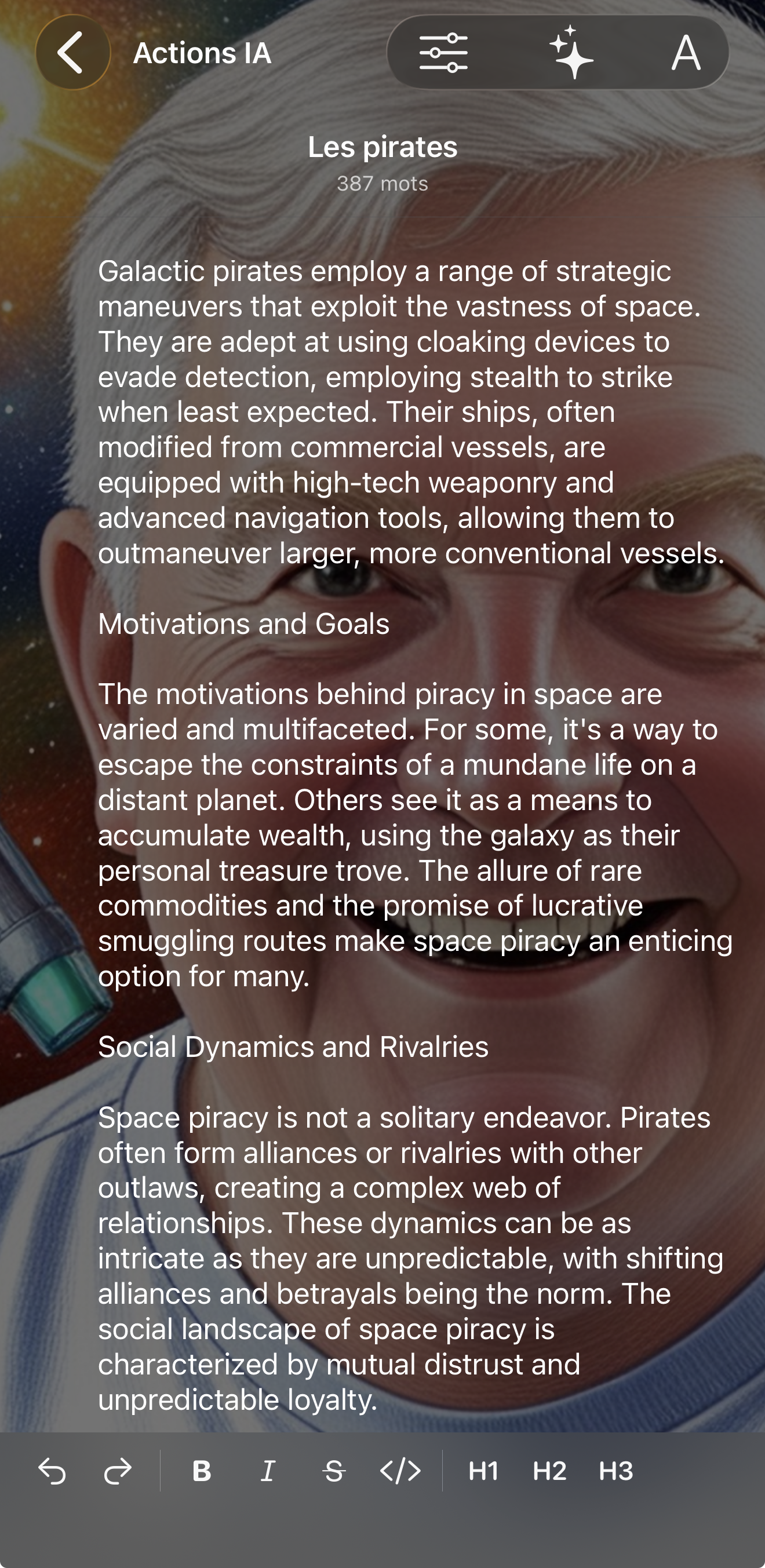
  • Background image generation through Apple's ImagePlayground API
  • Per-document background customization with contrast controls

Search & Discovery

Locate any paragraph instantly and stay aware of upcoming insights.

  • Full-text search across document titles and content
  • Coming soon Tag-based filtering with custom category support
  • Coming soon Recent documents quick access
  • Coming soon Word count tracking and document statistics
Sync & Accessibility

Stay in flow with reliable iCloud Drive sync

Your documents live as Markdown files on iCloud Drive — edit them anywhere, and Writify picks up changes automatically.

iCloud Drive Storage

Documents are standard Markdown files on your iCloud Drive — open, edit, or move them with any app.

  • Standard Markdown files you own and control on iCloud Drive
  • Edit documents outside Writify — changes sync back automatically
  • Offline-first architecture with local storage fallback
  • Sync status indicators that surface connection health in real time
  • No proprietary database — your files are always accessible

Cross-Device Compatibility

Responsive layouts feel at home on iPhone, iPad, and Mac with a single universal purchase.

  • Universal iOS/iPadOS support with a minimum requirement of iOS 26
  • Responsive layouts tuned for screen size, orientation, and input method
Visual Customization

Design immersive spaces with adaptive visuals

Pair productivity with ambiance using AI-generated backdrops, glassmorphism, and theme-aware typography.

Background & Visual Features

Set the mood for every chapter while maintaining perfect legibility.

  • AI-generated document backgrounds powered by Apple's ImagePlayground
  • Background texture service packed with curated visual themes
  • Per-document background prompts, styles, and presets
  • Glass effect UI elements across the interface
  • Background contrast adjustments for optimal text readability

Interface Customization

Tailor the interface to match your eyes, environment, and brand.

  • Adaptive text sizing and zoom controls
  • Theme support with automatic system dark/light mode integration
  • Customizable project colors and icons for instant recognition
Advanced Features

Safeguard and scale with professional controls

Export work anywhere, share securely, and refine AI behaviour for every collaboration.

Import & Export

Move documents between tools without losing structure or metadata.

  • Markdown export including document metadata
  • Plain text export for universal compatibility
  • Native iOS share sheet integration for quick sharing
  • Backup and restore via JSON for full workspace snapshots

AI Action Management

Build a curated AI toolkit that evolves alongside every project.

  • Create and manage custom AI prompts
  • Central library of reusable AI actions
  • Context-aware prompting that reacts to the active document
  • AI rejection feedback loop to improve future responses
  • Temperature control for creative or precise output
Key User Benefits

Why writers choose Writify

A feature-rich roadmap is only valuable when it translates into measurable impact. These benefits show how Writify accelerates creative teams from first idea to final delivery.

Seamless writing experience

Craft, revise, and publish from any Apple device — your Markdown files stay on iCloud Drive, always in sync.

AI-enhanced productivity

Leverage context-aware assistance, reusable actions, and project memories to move faster.

Professional organization

Manage multiple projects, folders, and tags with clarity from draft to delivery.

Your files, your control

Standard Markdown on iCloud Drive — no lock-in, no proprietary formats, always accessible.

Global-ready workspace

Enable cultural nuance and multilingual collaboration across teams and clients.

Immersive customization

Transform every document with AI backgrounds, theme-aware UI, and precise controls.

AI-Powered Writing

Expert actions, one tap away

A curated library of expert-crafted AI writing actions — from grammar fixes to manuscript overhaul plans — that work natively in 27+ languages, learn from your feedback, and run entirely on-device with Apple Intelligence. No prompt engineering required.

Expert Actions, Zero Effort

A curated library of writing actions built by experts, executable with one tap, customizable to your workflow. No prompt engineering required.

Truly Multilingual

Not translated English. Native language intelligence with cultural context, formality awareness, and support across 27+ languages.

Private by Design

Powered by Apple Intelligence on-device. Your writing never leaves your device. No external AI subscriptions required.

Action Library

One tap. Expert results.

Each action is a refined, tested prompt pattern designed by writing experts. Users don't need to become prompt engineers — just select, tap, and review.

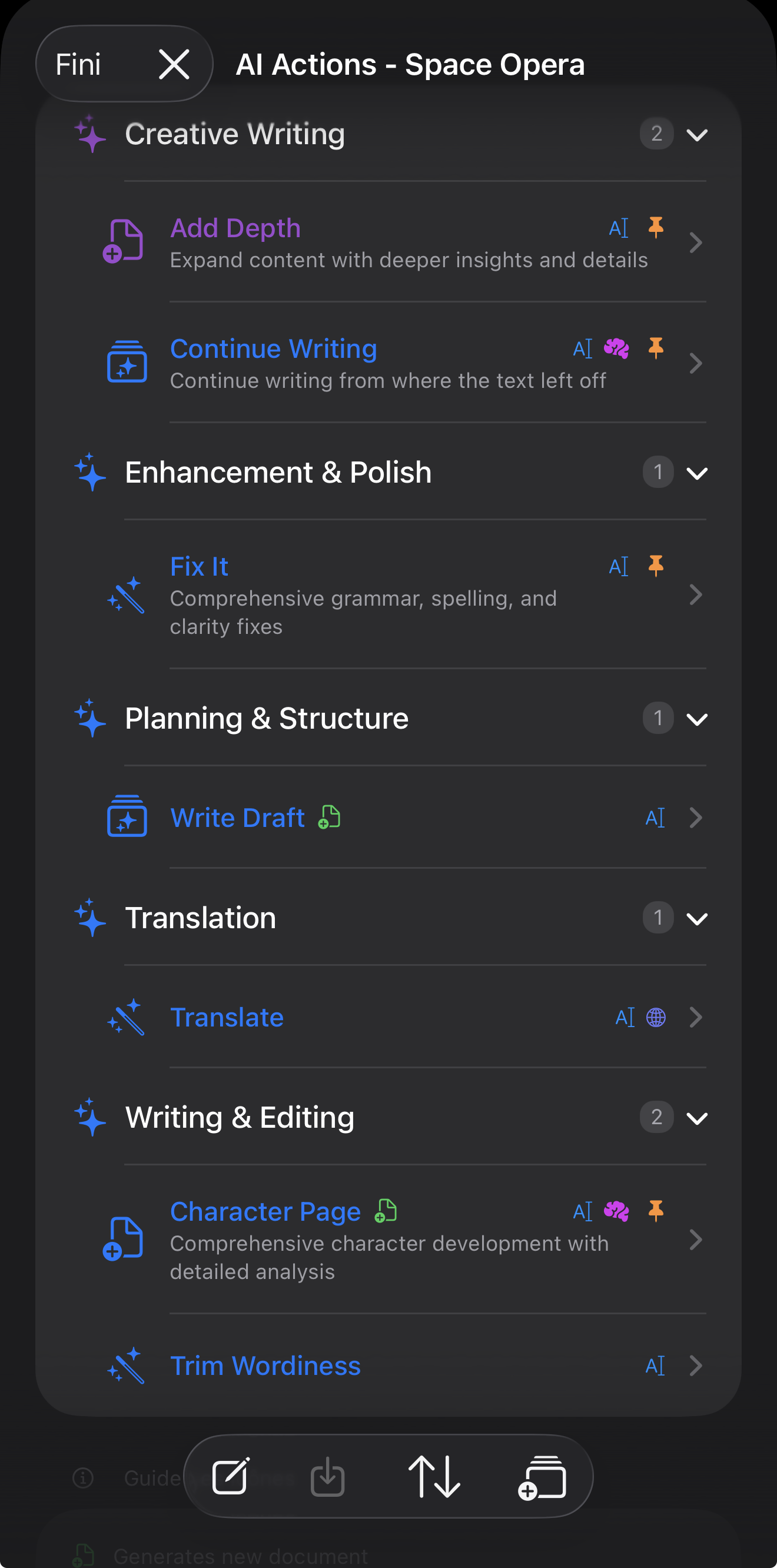
Add Depth Expands content with richer insights and supporting details
Continue Writing Picks up where you left off, matching voice and direction
Check Grammar Focused correction without changing your style
Get Feedback Constructive, actionable criticism on selected text
Character Page Comprehensive character development questionnaire
Manuscript Overhaul Strategic editing roadmap for long-form work
Editing Plan Step-by-step editing strategy for any piece
Create Ad Copy Marketing-ready content from source material
Email Newsletter Reformats content into newsletter-ready format
Connect Sections Intelligently links content between document sections
Intrigue Page Creates compelling openings that hook readers
List Next Steps Generates actionable to-do items from content
See It in Action

AI Actions across every device

Pin your favorite actions to the toolbar. Execute with one tap on iPhone, iPad, or Mac. Your customizations, pinned actions, and AI session history sync seamlessly via iCloud Drive.

iPad Screenshot
iPhone Screenshot
Inline Review

Accept or reject — the AI learns your voice

Results appear inline in your document — not in a separate chat. See exactly how AI output looks in context, then decide with one tap. When you reject, optional feedback actively improves future results within your project.

1

Select

Choose an action from your pinned toolbar or the full library

2

Execute

One tap — the AI processes your text with full project context

3

Review

See the result inline, exactly as it will appear in your document

4

Decide

Accept to commit, or reject to restore your original text instantly

Rejection feedback that improves results

  • Wrong tone or style
  • Too verbose
  • Too brief
  • Off topic
  • Factually incorrect
  • Custom feedback
Full Ownership

Your actions, your rules

Every AI Action is fully customizable. Edit prompts, change icons, organize by category, and share with collaborators. The system scales from "fix my grammar" to a custom action library for your screenwriting workflow.

Fully editable prompts

Modify the underlying instruction with full access to template variables like {{selectedWords}}, {{activeDocument}}, and {{contextDocuments}}.

Pinned actions toolbar

Pin your most-used actions for instant access — always one tap away, right where you're writing.

Import & export

Share custom actions as JSON. Build specialized action sets for screenwriters, academics, or marketing teams.

Project-scoped AI memory

Each project maintains its own AI session. Your fiction voice stays separate from your business voice. Rejection patterns are per-project.

AI that writes with you, not for you

Writify's AI Actions are powered by Apple Intelligence through the FoundationModels framework. On-device processing, no third-party AI services, no cloud subscriptions. Your writing never leaves your device.

  • On-device processing with Apple Intelligence
  • No external AI subscription required
  • Works offline — no internet needed
  • Free tier: 5 actions at setup, 7 total per project
Cross-Device Compatibility

Write anywhere with one unified experience

Whether you prefer the precision of a keyboard, the freedom of Apple Pencil, or quick mobile edits, Writify keeps your Markdown files synchronized through iCloud Drive.

iPad & Apple Pencil

Storyboard, outline, and draft with immersive focus.

Stage Manager and split view keep research beside your manuscript while Apple Intelligence surfaces context-aware prompts right where you write.

  • Per-document zoom controls and adaptive font scaling for long-form comfort
  • Folder hierarchy with drag-and-drop organization inside every project
  • AI-generated ImagePlayground backgrounds with contrast-aware overlays
  • iCloud Drive sync indicators so you always know when iPad is up to date

iPhone

Capture ideas and make quick edits anywhere.

The universal iOS 26 interface keeps the full editor at your fingertips — documents sync via iCloud Drive and stay available offline.

  • Full-text search across titles and content, optimized for one-handed use
  • Quick filters for folders and project tags on the go
  • Coming soon Recent documents quick access
  • Sync status bar with friendly messaging for conflicts or offline states
  • Access to your custom AI action library for in-the-moment assistance

Mac

Power through revisions with keyboard-first precision.

Multiple windows, deep shortcuts, and export-ready controls make Mac the command center for publishing.

  • Markdown and plain text export with document metadata preserved
  • JSON backup and restore for safeguarding entire workspaces
  • Temperature and AI prompt controls directly alongside your manuscript
  • Customizable project colors, icons, and background textures for every workspace

Markdown files on iCloud Drive — built for creative confidence

Every document is a standard Markdown file on your iCloud Drive. Edit them in Writify, a text editor, or any Markdown app — changes sync automatically across all your Apple devices.

  • Standard Markdown files — no proprietary format or database
  • Edit documents outside Writify and changes appear automatically
  • Per-project AI conversation history maintained across devices
📝
💡
🎯

Launch your Apple-first writing workflow

Your documents live as Markdown files on iCloud Drive with FoundationModels assistance and adaptive backgrounds across iPhone, iPad, and Mac. Download Writify free and bring every project together.

Markdown files on iCloud Drive — edit them anywhere
Offline-first local storage resilience
Custom AI action library included
Per-project language controls

System Requirements

📱
iOS & iPadOS
iOS / iPadOS 26.0 or later
Apple Intelligence enabled devices
💻
macOS
macOS Sequoia 15.0 or later
Apple Silicon recommended for ImagePlayground